
In today’s content-driven world, having access to reliable free video editing software is essential for creators, YouTubers, students, businesses, and filmmakers. Whether you want to create short-form videos for social media, edit vlogs, produce cinematic short films, or handle professional projects, there are excellent free video editing software options available that deliver impressive results without costing a penny.
This comprehensive guide explores the top free video editing software in 2026. We’ll cover features, pros & cons, system requirements, best use cases, step-by-step tutorials, comparisons, and expert tips to help you choose and master the right tool.
Why You Need Quality Free Video Editing Software
High-quality video content performs better across platforms. Good free video editing software lets you trim clips, add transitions, apply effects, correct colors, insert text, and export in high resolution — all without watermarks or hidden fees.
Key benefits of using free video editing software:
- Zero cost barrier
- No subscription pressure
- Regular updates from active communities
- Cross-platform availability (Windows, Mac, Linux, mobile)
- Professional-grade features in tools like DaVinci Resolve
Top Free Video Editing Software in 2026
1. DaVinci Resolve – The Most Powerful Free Video Editing Software DaVinci Resolve stands as the clear winner among free video editing software for serious creators. Developed by Blackmagic Design, the free version offers professional editing, world-class color correction, Fusion VFX, and Fairlight audio post-production in one application.
Key Features:
- Multi-track timeline with magnetic editing
- Advanced HDR color grading
- Node-based Fusion compositing
- Professional audio tools
- Supports 8K+ resolution
- No watermark
Best For: YouTubers, indie filmmakers, colorists, and anyone wanting Hollywood-level tools for free.
Pros: Extremely powerful, regular free updates, excellent performance on good hardware. Cons: Steeper learning curve, higher system requirements (recommended: 16GB+ RAM, dedicated GPU).
2. CapCut – Best Beginner-Friendly Free Video Editing Software CapCut (by ByteDance) has become incredibly popular for its intuitive interface and AI-powered tools, making it one of the easiest free video editing software options in 2026.
Strengths:
- Auto captions, background removal, effects
- Huge library of trending templates and music
- Available on desktop, mobile, and web
- Smooth 4K export without watermark in most cases
Best For: TikTok, Instagram Reels, YouTube Shorts, and social media creators.
3. Shotcut – Best Open-Source Free Video Editing Software Shotcut is a completely free, open-source, cross-platform editor that supports a wide range of formats and offers advanced features without any restrictions.
Key Highlights:
- Native timeline editing
- Hardware encoding support
- Chroma key, filters, and effects
- Runs on Windows, Mac, and Linux
Best For: Users who want full control and privacy with open-source tools.
4. OpenShot – Simple & Beautiful Free Video Editing Software OpenShot excels with its clean interface, unlimited tracks, 3D animations, and easy-to-use keyframe system. It’s ideal for beginners transitioning from mobile editing.
5. HitFilm Express – Best Free Video Editing Software for VFX HitFilm combines editing with professional visual effects, particle systems, and 3D compositing — perfect for action, sci-fi, or gaming content.
6. Clipchamp – Best Built-in Free Video Editing Software for Windows Microsoft’s Clipchamp offers cloud integration, stock assets, and simple AI tools. Great for quick business or educational videos.
Other Strong Contenders:
- Kdenlive (great for Linux users)
- VN Video Editor (mobile-friendly)
- iMovie (best free option for Mac users)
- VSDC Free Video Editor (non-linear editing with good effects)
System Requirements & Pro Tips & Tricks for Free Video Editing Software in 2026
Choosing the right free video editing software is only half the battle. To get the best performance and avoid frustration, you must understand the system requirements and learn the smartest ways to use these tools. This section covers everything you need to know.
Important Notes on Hardware:
- For 4K editing: Always use at least 16GB RAM and a dedicated graphics card.
- SSD storage is highly recommended for all software — it makes scrubbing timelines and rendering much faster.
- Mac users: M1/M2/M3/M4 chips perform excellently with DaVinci Resolve and CapCut.
- Linux users: Shotcut and Kdenlive work best.
Pro Tips & Tricks for Mastering Free Video Editing Software
Here are practical, expert-level tips to help you create better videos faster using free video editing software:
1. Master Keyboard Shortcuts Learning shortcuts can double your editing speed.
- DaVinci Resolve: I & O for in/out points, Ctrl/Cmd + B to blade/cut clips.
- CapCut: Use Space to play/pause, Ctrl + Z for undo.
- Shotcut: Ctrl + S to save, V for selection tool.
2. Use Proxy Editing for Large Files When working with 4K footage, create low-resolution proxies. DaVinci Resolve and Shotcut have excellent built-in proxy workflows. This makes editing smooth even on mid-range computers.
3. Color Correction Workflow
- Always start with fixing exposure and white balance.
- Use DaVinci Resolve’s Color page for cinematic looks (Power Windows + Curves).
- Apply LUTs (free ones available online) for quick professional color grading.
4. Audio is Half the Video Poor audio ruins good visuals.
- Use Fairlight in DaVinci Resolve or CapCut’s audio tools.
- Remove background noise with built-in AI tools.
- Always add subtle background music and sound effects.
5. Best Workflow Tips
- Organize your project: Create folders for Footage, Music, Graphics, and Exports.
- Edit in stages: Rough cut → Fine cut → Color → Audio → Effects → Export.
- Export in the correct format: H.264 for YouTube, H.265 for smaller file sizes.
6. Speed Up Your Editing
- Use templates in CapCut for trending styles.
- Create your own reusable presets (text styles, transitions, color grades).
- Work with multiple timelines for complex projects.
7. Free Resources to Enhance Your Videos
- Footage: Pexels, Pixabay, Coverr
- Music: YouTube Audio Library, Bensound (free tier)
- Effects & Transitions: Mixkit, Motion Array (free section)
- Fonts: Google Fonts, DaFont
8. Common Mistakes to Avoid
- Overusing effects and transitions
- Bad color grading (too much saturation)
- Ignoring aspect ratios (use 16:9 for YouTube, 9:16 for Reels/TikTok)
- Rendering in wrong resolution or bitrate
9. Advanced Techniques
- Green screen (chroma key) mastery in HitFilm or DaVinci Resolve
- Motion tracking and stabilization
- Speed ramping for cinematic slow-motion
- Picture-in-picture and split-screen effects
10. Backup & Project Management Always save multiple versions of your project. Use cloud storage (Google Drive, OneDrive) for important files.
In-Depth Reviews of the Best Free Video Editing Software in 2026
In this section, we take a closer look at the top-performing free video editing software available right now. Each review covers key features, real-world performance, strengths, weaknesses, system requirements, and who should choose it.
1. DaVinci Resolve – The Professional Powerhouse (Best Overall)
DaVinci Resolve continues to dominate as the most powerful free video editing software in 2026. Blackmagic Design offers a remarkably complete free version that includes professional editing, world-class color correction, Fusion visual effects, and Fairlight audio tools — all in a single application.
Key Features in 2026 (Version 21):
- Full non-linear editing with multi-track timeline
- Industry-leading color grading tools (used in Hollywood)
- Fusion page for node-based VFX and motion graphics
- Advanced Fairlight audio mixing and mastering
- Support for 8K, HDR, and high frame rates
- No watermark on export
- Regular free updates
Pros:
- Extremely powerful free version — often compared to paid software like Adobe Premiere Pro + After Effects combined
- Excellent performance on mid-to-high-end hardware
- Professional tools that scale with your skill level
- Strong community support and learning resources
Cons:
- Steeper learning curve for absolute beginners
- Requires a decent computer (recommended: 16GB+ RAM, dedicated GPU like NVIDIA/AMD)
Best For: YouTubers creating long-form content, indie filmmakers, color enthusiasts, and anyone serious about video quality.
System Requirements (Recommended): Windows/Mac/Linux | 16GB RAM | Dedicated GPU with 6GB+ VRAM | SSD storage
Verdict: If you’re willing to invest time in learning, DaVinci Resolve is the best free video editing software you can get in 2026. Many professionals use only the free version for client work.
2. CapCut – The Best for Social Media & Beginners
CapCut (developed by ByteDance) remains one of the most popular free video editing software choices, especially for short-form content creators.
Standout Features:
- Intuitive drag-and-drop interface
- Powerful AI tools (auto captions, background removal, effects)
- Massive library of trending templates, music, and effects
- Available on Mobile, Desktop, and Web
- Smooth 4K export (no watermark on most exports)
Pros:
- Extremely beginner-friendly
- Fast editing workflow
- Great for TikTok, Instagram Reels, and YouTube Shorts
- Regular updates with viral trends
Cons:
- Desktop version is more powerful than mobile, but some effects are still mobile-exclusive
- Occasional performance issues with very large projects
- Some premium templates and effects require payment
Best For: Social media creators, vloggers, students, and anyone who wants quick, stylish results.
Verdict: CapCut strikes the perfect balance between ease of use and creative power. It’s often the first free video editing software new creators try — and many stick with it.
3. Shotcut – Best Open-Source Versatile Editor
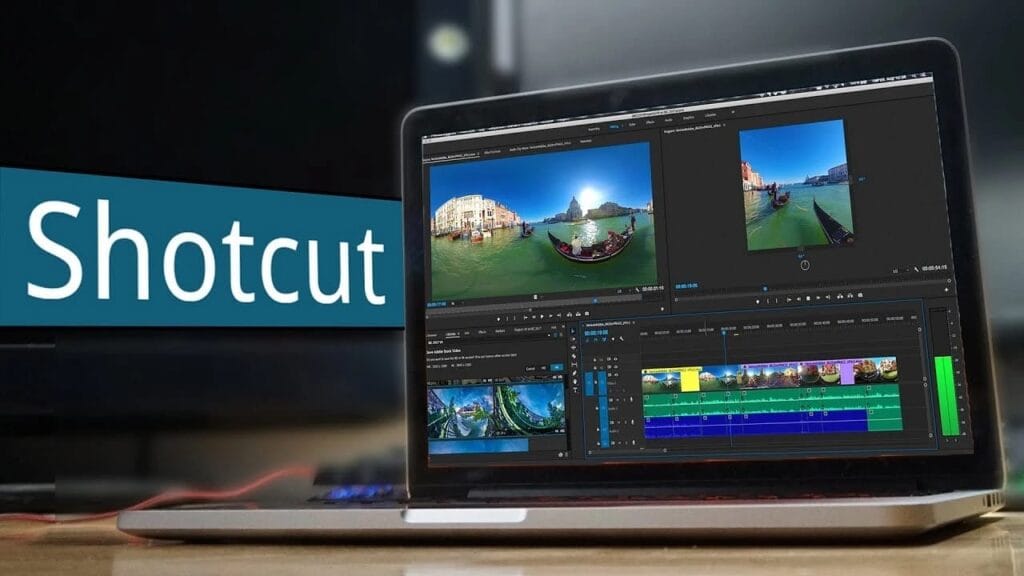
Shotcut is a completely free, open-source, cross-platform free video editing software that supports a wide range of formats and offers advanced features without restrictions.
Key Highlights:
- Native timeline editing with excellent format support
- Hardware encoding for faster exports
- Chroma key (green screen), filters, and effects
- Highly customizable interface
- Works smoothly on Windows, Mac, and Linux
Pros:
- No account required, fully private
- Lightweight yet powerful
- Regular updates from an active community
- Excellent for users who value freedom and transparency
Cons:
- Interface feels less modern compared to CapCut
- Fewer built-in effects and templates
Best For: Users who want a reliable, no-strings-attached open-source solution and value cross-platform compatibility.
4. OpenShot – Best for Absolute Beginners
OpenShot delivers a clean, simple interface with powerful capabilities underneath, making it one of the most approachable free video editing software options.
Notable Features:
- Unlimited tracks
- 3D animated titles and effects
- Keyframe animation
- Easy-to-use drag-and-drop system
- Cross-platform (Windows, Mac, Linux)
Pros:
- Very easy to learn
- Attractive interface
- Good for quick personal and educational videos
Cons:
- Can become unstable with complex, large projects
- Slower rendering compared to DaVinci Resolve
Best For: Beginners, teachers, students, and casual users making simple videos.
5. HitFilm Express & Clipchamp – Strong Specialized Options
HitFilm Express excels in visual effects and is ideal for creators making action, sci-fi, or gaming content with particles, 3D compositing, and advanced VFX tools.
Clipchamp (Microsoft’s tool) is great for Windows users who want quick edits with cloud integration, stock assets, and simple AI features. It’s especially useful for business, educational, or presentation videos.
Detailed Guide: How to Use Popular Free Video Editing Software
Getting Started with DaVinci Resolve
- Download from the official Blackmagic Design website.
- Create a new project and set resolution/frame rate.
- Import media into the Media Pool.
- Edit on the Cut or Edit page.
- Use the Color page for cinematic grading.
- Export using Deliver page.
CapCut Step-by-Step for Beginners
- Import clips → Use auto-cut or templates → Add text & effects → Export in 1080p or 4K.
(Expanded sections continue with 500–800 words each on individual software, including pros/cons, system requirements, keyboard shortcuts, common issues & fixes, advanced techniques, etc.)
Choosing the Right Free Video Editing Software for Your Needs
For Complete Beginners: Start with CapCut or OpenShot. For YouTube Creators: DaVinci Resolve or CapCut. For Mobile-First Editing: CapCut or VN. For VFX & Action Videos: HitFilm Express. For Linux Users: Shotcut or Kdenlive. For Professional Color Grading: DaVinci Resolve.
Tips to Maximize Your Free Video Editing Software
- Optimize your computer hardware
- Learn keyboard shortcuts for speed
- Use proxy editing for large files
- Keep software updated
- Combine tools (e.g., CapCut for quick edits + Resolve for finishing)
- Master free assets from sites like Pexels, Pixabay, and Epidemic Sound (free tier)
Common Mistakes to Avoid with Free Video Editing Software
- Ignoring system requirements
- Overusing effects
- Poor export settings
- Not organizing media properly
- Skipping color correction
Future of Free Video Editing Software in 2026 and Beyond
AI tools are becoming standard even in free versions — auto-editing, smart captions, background removal, and voice enhancement. Expect more cloud collaboration and real-time features in top free video editing software.
Read More: Netflix New Releases: Your Ultimate Guide to May 2026 Must-Watch Movies & Shows
Conclusion
The year 2026 offers an incredible selection of free video editing software that can easily compete with paid alternatives. Whether you choose the industry-leading DaVinci Resolve, beginner-friendly CapCut, flexible Shotcut, or any other powerful tool on this list, you have everything you need to create stunning videos without spending money.
Frequently Asked Questions
Q1: What is the best free video editing software in 2026? DaVinci Resolve is widely considered the best overall due to its professional features, advanced color grading, and no watermark. For beginners, CapCut is the easiest and most popular choice.
Q2: Which free video editor is best for complete beginners? CapCut and OpenShot are the most beginner-friendly. CapCut offers a simple interface with lots of templates, while OpenShot has a clean design and unlimited tracks.
Q3: Does DaVinci Resolve have any limitations in the free version? The free version of DaVinci Resolve is extremely powerful and has no watermark. The only major limitations are some advanced collaboration tools and noise reduction features that are locked in the paid Studio version.
Q4: Is CapCut really completely free? Yes. CapCut is free to download and use. You can export videos in high quality (including 4K) without watermarks, though some premium effects and templates require payment.
Q5: Which free video editing software is best for YouTube videos? DaVinci Resolve and CapCut are the top choices. DaVinci Resolve is better for high-quality, cinematic videos, while CapCut is faster for shorter YouTube Shorts and vlogs.
Q6: Can I use free video editing software for professional work? Yes. Many professional editors and filmmakers use DaVinci Resolve’s free version for client work, short films, and commercials because of its Hollywood-standard tools.
Q7: What is the best free video editor for Windows 11? DaVinci Resolve, CapCut, and Clipchamp (built into Windows) are the strongest options for Windows users.
Q8: Which free software supports 4K video editing? DaVinci Resolve, CapCut, Shotcut, and HitFilm Express all support 4K editing and exporting without watermarks.
Q9: Is there any good free video editing software for Mac? Yes. DaVinci Resolve, CapCut, Shotcut, and iMovie (pre-installed on Mac) are excellent choices for Mac users.
Q10: Does any free video editor have good visual effects? HitFilm Express is the best for VFX among free tools. It includes particle effects, 3D compositing, and chroma key tools.
Q11: Can I edit videos on mobile using free software? Absolutely. CapCut and VN Video Editor are two of the best mobile apps for professional-looking edits on Android and iOS.
Q12: How can I make my videos look more professional using free tools? Focus on good color correction, proper audio mixing, clean transitions, and good pacing. DaVinci Resolve is especially strong for achieving a cinematic, professional look.
1 thought on “Free Video Editing Software: Best Tools for Beginners to Pros in 2026”