
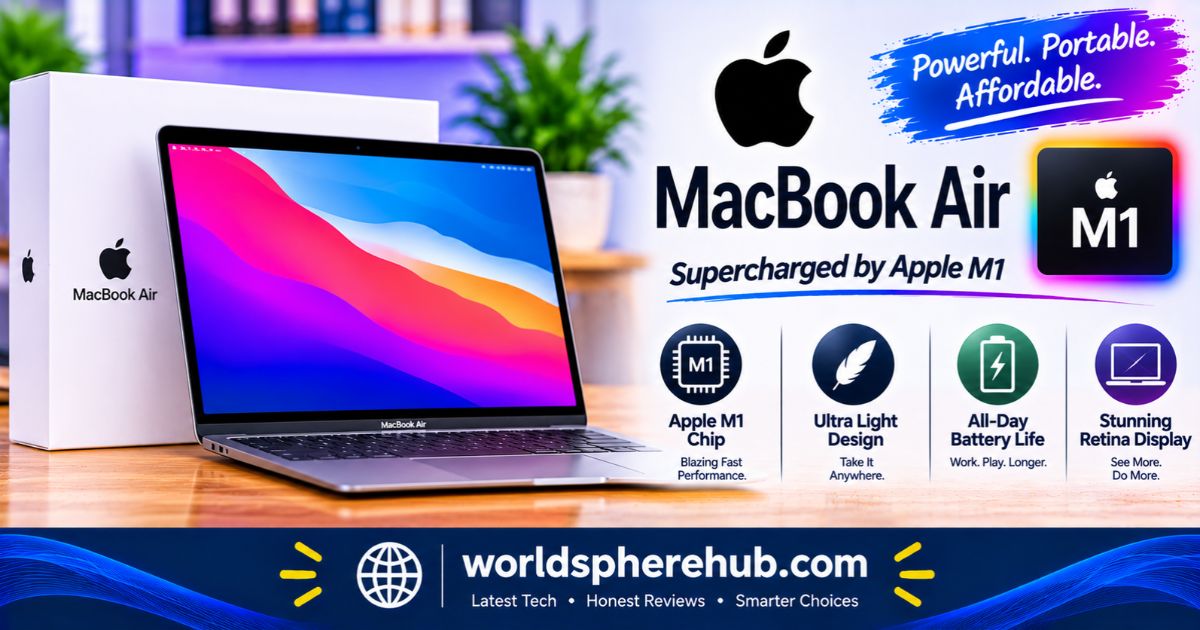
Apple MacBook Air M1 Review: Is It Still Worth It in 2026?
SHORT DIRECT ANSWER
The Apple MacBook Air M1 is a fanless 13.3-inch laptop with an M1 chip, Retina display, Touch ID, and Apple-rated battery life of up to 18 hours of video. It remains fast for everyday work and supports macOS 27, though ports, webcam quality, and 8GB base memory feel dated.
Key Specifications at a Glance
| Feature | Details |
|---|---|
| Display | 13.3-inch Retina IPS, 2560 x 1600, P3 wide color, True Tone |
| Chip | Apple M1, 8-core CPU (4 performance, 4 efficiency) |
| Graphics | 7-core or 8-core GPU |
| Neural Engine | 16-core |
| Memory | 8GB or 16GB unified memory |
| Storage | 256GB to 2TB SSD |
| Ports | Two Thunderbolt/USB 4 ports, 3.5mm headphone jack |
| Camera | 720p FaceTime HD |
| Security | Touch ID |
| Battery | Up to 15 hours web browsing, up to 18 hours video playback (Apple) |
| Weight | About 2.8 lb (1.29 kg) |
| Colors | Silver, Space Gray, Gold |
Design and Build Quality
Slim, Silent, and Fanless
The M1 Air uses the familiar wedge-shaped aluminum design, tapering from about 0.63 inches at the back to 0.16 inches at the front. At roughly 2.8 pounds, it is easy to carry in a bag all day. The design has no fan at all, so it makes no noise during normal use. That silence is a big reason many owners still love it.
Keyboard, Trackpad, and Touch ID
The backlit Magic Keyboard uses the scissor-switch mechanism that replaced the troubled butterfly design on older models. It is comfortable for long typing sessions. The large Force Touch trackpad feels precise, and Touch ID adds fast fingerprint unlocking and Apple Pay authentication.
Colors
The M1 Air came in Silver, Space Gray, and Gold. Used units may show wear on corners and the underside, so look closely at photos or inspect in person.
Display
The 13.3-inch Retina display has a 2560 x 1600 resolution, support for the P3 wide color gamut, and True Tone, which adjusts color temperature to your surroundings. Text looks sharp, and colors are accurate for everyday photo editing and streaming. Apple rates brightness at 400 nits, so it is fine indoors but can feel dim in strong sunlight.
Compared with newer MacBook Air models, the screen is slightly smaller and lacks the larger size and notch design of later generations. Many users prefer the thicker bezels, though, because they leave the webcam area uncluttered.
Performance
The M1 Chip
The M1 chip has an 8-core CPU with four performance cores and four efficiency cores, a 7-core or 8-core GPU, and a 16-core Neural Engine. Apple originally claimed up to 3.5 times faster CPU and up to 5 times faster graphics than the Intel model it replaced. The Air also stays silent because it has no fan.
Everyday Use in 2026
For browsing, email, documents, video calls, streaming, photo editing, and light coding, the M1 still feels quick. One writer who bought an M1 Air in 2026 called it a fantastic choice for anyone who needs something that simply works. BGR also describes it as remains compelling for light work.
Because there is no fan, sustained heavy loads such as long video exports can cause the chip to slow down as it heats up. If you edit video or compile large projects all day, a MacBook Pro or newer Air will handle it better.
Memory Matters
Many M1 Air units have only 8GB of unified memory. That is workable for basic tasks, but heavy multitasking with many browser tabs and apps can push it. If you can find a 16GB model, it is a smart upgrade for longevity.
Battery Life
Apple rated the M1 Air for up to 15 hours of wireless web browsing and up to 18 hours of Apple TV app movie playback, which was the longest battery life in an Air at launch. Those figures came from new batteries, and real use depends on brightness, apps, and age.
On a used or refurbished unit, battery health can be the biggest variable. After several years of charging cycles, capacity declines, so check the battery’s cycle count and condition before buying. A MacBook Air that lasts a full day when new may last noticeably less after years of daily use.
Charging uses a 30W USB-C power adapter and a USB-C cable, as listed in the original box contents, though used units may not include them.
Camera, Speakers, and Microphones
The webcam is a 720p FaceTime HD camera, which is one of the Air’s weaker points. It works for video calls, but image quality looks soft compared with the 1080p cameras on later MacBook Air models. Apple’s image signal processor in the M1 improves quality over previous 720p cameras, but it still falls short of modern laptops.
Audio is better. The Air has stereo speakers with wide stereo sound, and the three-microphone array handles calls well. For casual listening and video meetings, it is perfectly usable.
Software and macOS 27 Support
The M1 Air launched with macOS Big Sur, and Apple has confirmed it supports macOS 27 Golden Gate, which arrived in September 2026. This is important because macOS 27 dropped support for Intel Macs entirely, but it still supports Apple silicon MacBook Air and MacBook Pro models from 2020 onward. That means the M1 Air should keep receiving updates at least through the macOS 27 cycle, and likely beyond.
There are caveats:
- Apple has not guaranteed support for future versions, so treat support as a current snapshot.
- BGR noted that M1 Macs could eventually miss out on some newer features.
- Engadget reported that macOS 27 needs noticeably more storage space than Tahoe, which matters on 256GB models.
M1 Macs also support Apple Intelligence features, though availability depends on your region and language.
Connectivity and Ports
The M1 Air has two Thunderbolt/USB 4 ports on the left side, both of which can handle charging, data, and displays. It also has a 3.5mm headphone jack. Wi-Fi 6 and Bluetooth 5.0 round out wireless features.
Two limitations stand out. First, the Air supports only one external display. Apple’s support pages note it supports a single external monitor, and Apple community responses repeat that even with docks. Second, there is no MagSafe charging, no HDMI port, and no SD card slot, so you will likely need a dongle or hub.
Benefits and Limitations
| Benefits | Limitations |
|---|---|
| Silent, fanless operation | Only two ports and no MagSafe |
| Strong everyday performance | One external display supported |
| Excellent battery life when healthy | 720p webcam |
| Sharp Retina display with Touch ID | Many units have 8GB of memory |
| Supports macOS 27 | Older design, 400-nit display |
M1 Air vs Newer MacBook Airs
| Feature | MacBook Air M1 (2020) | Newer MacBook Air |
|---|---|---|
| Webcam | 720p | 1080p on later models |
| Charging | USB-C ports only | MagSafe on later models |
| Memory options | 8GB or 16GB | Larger options on newer models |
| External displays | One | More on newer chips |
The M2 Air from 2022 remains a worthwhile step up, and BGR says newer M4 and M5 models make sense mainly if you want improved internal specs, more RAM, more storage, and support for more external displays. If your needs are basic, the M1 Air is usually enough.
Buying Tips for a Used or Refurbished M1 Air
- Check the battery cycle count and health in System Settings
- Confirm the Mac is not locked to someone else’s Apple Account
- Prefer 16GB of memory if you can find it
- Consider 512GB of storage if you plan to run macOS 27 and many apps
- Look for a seller with a return policy or warranty
- Inspect the screen for scratches, dead pixels, and keyboard issues
Who Should Buy the MacBook Air M1?
The M1 Air is best for students, remote workers, writers, casual creators, and anyone who wants a reliable, quiet laptop that is still fast. It is also a good first Mac for people moving from Windows, especially if the price is right.
It is a weaker choice for people who need multiple external monitors, professional video editing, or high-quality webcams. If you want a newer design and more headroom, consider an M2 Air or later.
Frequently Asked Questions
1: Is the MacBook Air M1 still worth buying in 2026?
For light to moderate work, yes. It remains fast, silent, and long-lasting, and it supports macOS 27. Condition, battery health, and price matter most.
2: Does the MacBook Air M1 support macOS 27?
Yes. Apple’s macOS 27 Golden Gate supports Apple silicon MacBook Air models from 2020 onward, including the M1 Air. Intel Macs are not supported.
3: How many external displays can the MacBook Air M1 use?
It supports one external display. Apple’s specs and support community responses say additional monitors will not work, even through a Thunderbolt dock, unless you use special workarounds.
4: How long does the MacBook Air M1 battery last?
Apple rated it for up to 15 hours of web browsing and 18 hours of video playback when new. Real results vary, and older batteries may last less.
5: Is 8GB of RAM enough on the MacBook Air M1?
It is fine for basic tasks like browsing, documents, and streaming. Heavy multitasking benefits from the 16GB model, which is a smart pick for longevity.
Explore More Continue Reading Our Guide on: Sony Wireless Headphones Review: Which Model Should You Choose?
Apple iPad A16 Case Review: Smart Folio, Fit, Protection, and Stand Angles
JBL Bluetooth Speakers Review: Which Model Is Right for You?
Apple AirPods Pro 3 Review: Noise Cancellation, Fit, Battery, and Smart Features
Conclusion
The Apple MacBook Air M1 offers fast, silent, efficient performance, excellent battery life, a sharp Retina display, and macOS 27 support. Key limitations include only two ports, a 720p webcam, one external display, and 8GB of memory on many units.





One Comment