
Short Direct Answer:
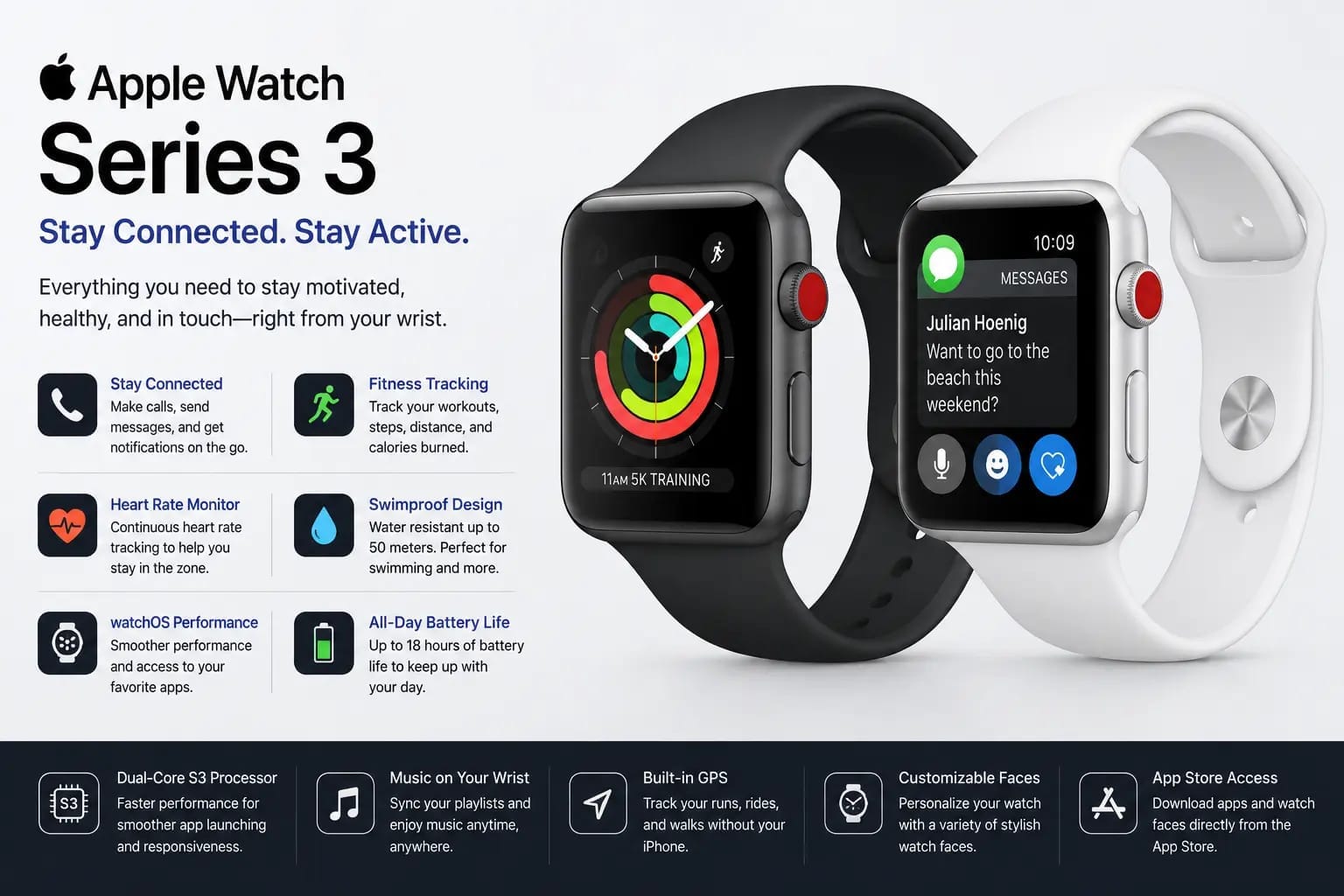
The Apple Watch Series 3 is an older smartwatch designed for basic everyday use. It offers fitness tracking, heart-rate monitoring, notifications, GPS, and workout features. Cellular models can also support calls and messages without a nearby iPhone. Its performance and software support are limited compared with newer Apple Watch models. The Series 3 is still useful for basic tasks if you already own one. For new buyers, a newer Apple Watch is generally a better long-term choice.
An Overview
The Apple Watch Series 3 was one of Apple’s most popular smartwatches for users who wanted a simple and useful wearable without paying for the latest model. It introduced a combination of fitness tracking, communication tools, health features, and everyday smartwatch functions in a compact design.
Although the device is now an older generation, many people still search for information about it because they may already own one, want to buy a used model, or simply want to understand what it can do. Knowing its features, design, performance, and limitations can help you decide whether it is still suitable for your needs.
The Series 3 was available in different versions, including GPS and cellular models. The cellular version was especially useful for people who wanted to stay connected while away from their iPhone. However, the experience you get today can be different from when the watch was first released because Apple’s software support and compatibility requirements have changed over time.
Apple Watch Series 3 Design and Build
The design of the Series 3 follows the familiar Apple Watch style. It has a rectangular case with rounded corners, a digital crown on the side, and a touchscreen display. The overall design is simple, making it suitable for everyday wear, exercise, and casual use.
The watch was offered in different case and band combinations, allowing users to choose a style that matched their personal preference. Its lightweight design also made it practical for wearing throughout the day.
The build quality was designed for regular daily use. The watch could be worn during workouts and other common activities, although users should always consider the condition of an older device before exposing it to water or demanding environments.
Display and Everyday Usability
The display provides access to notifications, apps, workout information, time, and other important details. Users can interact with the watch by tapping and swiping on the screen or using the Digital Crown.
For basic tasks, the interface is straightforward and easy to understand. You can check notifications, view activity information, control music, and access different apps directly from the watch.
Because the Series 3 uses older hardware, however, some actions may not feel as quick as they do on newer Apple Watch models. This is one of the main differences users may notice when comparing it with more recent generations.
Apple Watch Series 3 Features
One of the biggest reasons the Series 3 became popular was its range of everyday features. It was not simply a device for checking the time. It could work as a companion to an iPhone and help users monitor activity, receive notifications, and stay connected.
Its main features included activity tracking, workout tracking, heart-rate monitoring, notifications, music controls, and GPS on supported models. Cellular versions also offered additional communication options.
Fitness and Activity Tracking
Fitness tracking is one of the most useful parts of the watch. It can help users keep track of daily movement and workouts. The Activity app gives users information about their movement and encourages them to stay active throughout the day.
Workout tracking is also available for different types of exercise. Users can start a workout from the watch and review information related to their activity.
The heart-rate sensor can provide heart-rate information during everyday use and workouts. This can be useful for people who want a general view of their activity and exercise performance.
GPS and Location Tracking
GPS is another useful feature on supported models. It can help track outdoor activities such as walking and running without relying entirely on a phone for location information.
This feature can be helpful for users who want to review their route or distance during outdoor exercise. However, battery condition and the age of the device can affect the overall experience, especially on a used Series 3.
Cellular Connectivity
The cellular version of the watch was designed for people who wanted greater independence from their iPhone. With compatible cellular service, users could make calls, send messages, and use certain connected features while away from their phone.
This made the watch more convenient for activities such as going for a walk or workout without carrying an iPhone.
However, cellular functionality depends on carrier support and other requirements. Since the Series 3 is an older device, anyone considering a used cellular model should check compatibility with their current mobile network before buying.
GPS vs Cellular Model
The GPS and cellular versions are aimed at slightly different users. A GPS model is generally suitable for someone who normally keeps their iPhone nearby. It can provide many of the main Apple Watch features while relying more heavily on the connected iPhone.
A cellular model can offer more freedom when you are away from your phone, provided that the required cellular service is supported.
For someone buying a used watch today, the choice should depend on how the device will be used rather than simply choosing the more expensive version.
Apple Watch Series 3 Performance
When it was introduced, the Series 3 provided a useful smartwatch experience for its time. It could handle everyday tasks such as notifications, fitness tracking, calls on supported models, and basic apps.
Today, its older processor and hardware make it less competitive with newer Apple Watch models. Apps and system functions may not feel as responsive, and software compatibility is a major consideration for anyone thinking about purchasing one.
Is the Performance Still Good?
For simple tasks, the watch can still be useful. Checking the time, tracking basic activity, viewing notifications, and using supported features can work well for an existing owner.
The situation is different for someone looking for a smartwatch that will remain useful for many years. Newer Apple Watch models generally provide faster performance, more modern features, and stronger long-term software support.
This means the Series 3 makes more sense as a basic or already-owned device than as a long-term investment for most new buyers.
Apple Watch Series 3 Battery Life
Battery life is an important part of the experience with any smartwatch. The Series 3 was designed to provide a full day of typical use under suitable conditions, but actual battery performance depends on how the watch is used.
GPS activity, calls, notifications, workouts, and cellular features can increase battery consumption. An older watch can also have a battery that has naturally lost capacity over the years.
Battery Condition on Used Models
If you are considering a second-hand Series 3, battery condition should be checked carefully. Two watches of the same model can have very different battery performance depending on their age and previous use.
A device with poor battery health may require more frequent charging and can become inconvenient for everyday use. Therefore, the condition of the individual watch is often just as important as its original specifications.
Software Support and Compatibility
Software support is one of the biggest limitations of this older Apple Watch. Newer Apple Watch models receive access to newer versions of watchOS and newer features, while older models eventually reach the limits of their supported software.
This can affect app compatibility, security updates, and access to newer functions. It is an important point to consider before buying a used Series 3.
For existing owners, the watch can continue to perform supported functions, but expectations should be realistic. It should not be compared directly with the capabilities of current Apple Watch models.
Who Is the Apple Watch Series 3 For?
The Series 3 can still make sense for a few types of users. Someone who already owns the watch and only needs basic features may continue using it. It may also interest people who want to learn how Apple Watch works without needing advanced features.
However, anyone buying a smartwatch for long-term use should carefully consider newer alternatives. A newer model can provide better performance, broader software support, and more modern features.
Apple Watch Series 3 Health and Fitness Features
Fitness tracking is one of the main reasons people choose an Apple Watch. The Series 3 was built to help users monitor daily activity and record different types of workouts. For its time, it offered a useful set of tools for people who wanted a smartwatch that could also support an active lifestyle.
The watch can track movement throughout the day and provide information about activity levels. It also includes workout features that allow users to record exercise sessions and review basic results afterward.
For someone who already owns the watch, these features can still be useful for everyday activity. However, newer models offer more advanced health and fitness functions, so expectations should be kept realistic.
Activity and Workout Tracking
The Activity app is designed to make daily movement easier to understand. It provides information about activities and encourages users to stay active during the day.
You can use the watch to record different workouts and check information while exercising. This can be useful for walking, running, cycling, and other supported activities.
The main advantage is convenience. Instead of taking out your iPhone during a workout, you can check important information directly from your wrist.
Heart Rate Monitoring
Heart-rate monitoring is another important feature. The built-in sensor can measure your heart rate during normal use and physical activity.
This information can help users understand how their body responds to exercise. However, smartwatch readings should not be treated as a replacement for professional medical equipment or advice.
The Series 3 provides basic heart-rate information, while newer Apple Watch generations have added more health-related capabilities.
Using the Watch With an iPhone
The Series 3 works as part of the Apple ecosystem and is designed to work with a compatible iPhone. This connection allows users to receive notifications, synchronize information, install supported apps, and use other connected features.
The experience is generally simple when the watch and iPhone meet the required software and compatibility conditions.
Before buying an older model, it is important to check whether your current iPhone and software version are compatible. Compatibility can become more complicated with older Apple Watch models because newer iPhones and operating systems may have different requirements.
Notifications and Messages
One of the most convenient everyday features is receiving notifications on your wrist. Instead of checking your phone every time an alert arrives, you can quickly see supported notifications on the watch.
Depending on the setup and supported features, users can also interact with messages and other notifications.
This makes the watch useful for people who want quick access to important alerts without constantly reaching for their phone.
Music and Everyday Smart Features
The Series 3 can also be used for basic music controls and other everyday smartwatch tasks. Users can control compatible music playback from their wrist and perform supported actions without taking out their iPhone.
The watch can also provide information such as the time, calendar details, weather information, and notifications through supported apps.
These features may seem simple, but they are part of what made the Apple Watch useful as an everyday companion.
Siri and Voice Features
Siri can be used for supported voice-based tasks. Users can ask questions, perform certain actions, or interact with supported functions through voice commands.
The quality of the experience can depend on the software version, connection, and the specific task being performed. Because the Series 3 is an older device, it may not provide the same speed or feature set available on newer models.
Water Resistance and Exercise Use
The Series 3 was designed with water-resistant features that made it suitable for certain activities involving water. This was useful for swimmers and people who wanted to wear their watch during workouts.
However, water resistance is not permanent. It can become weaker as a device ages or after physical damage. This is especially important when purchasing a used model.
A second-hand watch that looks fine externally may still have experienced wear that affects its resistance to water. For this reason, users should be careful about exposing an older device to water.
Wearing It During Workouts
The compact design makes the watch convenient to wear during exercise. It can remain on the wrist while users track workouts and activity information.
The main benefit is having workout information available without carrying a larger device. For basic exercise tracking, this can still be useful.
However, users who need advanced sports tracking, newer sensors, or more detailed health information may find newer Apple Watch models more suitable.
Storage and Hardware Limitations
One of the important limitations of the Series 3 is its older hardware. Compared with modern Apple Watch models, it has less storage and fewer hardware capabilities.
Limited storage can affect the number of apps and content that can be kept on the watch. Older hardware can also make the device feel slower when opening apps or moving between different functions.
These limitations may not matter much to someone who only wants basic features. For heavier use, however, they can become noticeable.
Performance in Daily Use
The watch can handle basic tasks, but its age is more obvious when compared with newer models. Opening apps, loading information, and completing certain actions may take longer.
For simple notifications, activity tracking, and checking the time, the difference may not be a major problem. For users who expect a fast and modern smartwatch experience, it can be a significant limitation.
This is why the Series 3 should be evaluated based on its current condition and intended use rather than only its original specifications.
Buying a Used Apple Watch Series 3
Since the Series 3 is an older model, people who are interested in it today will often find it through the second-hand market. A used model can look attractive because of its lower price, but there are several things to check before purchasing.
The physical condition, battery health, software compatibility, and activation status can all affect the value of the watch.
A very cheap device may not always be a good deal if it has a weak battery or other hardware problems.
What to Check Before Buying
Before purchasing a used model, check the condition of the display and case for visible damage. Make sure the buttons and Digital Crown work properly and confirm that the touchscreen responds normally.
Battery condition is also important. An older battery may provide significantly less usable time than it did when the watch was new.
You should also confirm that the previous owner has removed the device from their Apple account. An activation-locked watch can create serious problems for a new owner.
Finally, check compatibility with your iPhone and make sure the features you need are supported.
Is It Still Worth Buying?
Whether the Series 3 is worth buying depends largely on the price and your expectations. If you already own one and only need basic smartwatch functions, there may be no urgent reason to replace it simply because it is old.
For a new buyer, however, the decision is more complicated. A very low-priced used model may seem appealing, but limited software support and older hardware reduce its long-term value.
A newer Apple Watch generally offers a better balance of performance, features, and future usability.
Who Should Consider It?
The Series 3 may be reasonable for someone who wants basic activity tracking and simple smartwatch functions and finds a device in good condition at a very low price.
It can also be useful as an inexpensive introduction to the Apple Watch experience, provided the buyer understands its limitations.
It is less suitable for users who want the latest health features, strong long-term software support, faster performance, or advanced smartwatch capabilities.
Apple Watch Series 3 vs Newer Models
The biggest difference between the Series 3 and newer Apple Watch generations is not simply appearance. Modern models generally provide faster processors, more advanced sensors, improved displays, better software support, and additional safety and health features.
The Series 3 can still perform many basic tasks, but its age means it cannot compete equally with current models.
For users who want a smartwatch for several years, choosing a newer generation can be a more practical decision.
Final Buying Considerations
Before making a purchase, think about what you actually need from a smartwatch. If you mainly want notifications, basic activity tracking, and simple everyday functions, an older model may meet those needs.
If you want a device that supports newer apps and features for a longer period, it is better to look beyond the Series 3.
Price should also be considered carefully. The lower cost of a used watch may be attractive, but a slightly newer model can sometimes provide significantly better value over time.
Apple Watch Series 3 Pros and Cons
The Series 3 can still be useful for basic smartwatch tasks, but it also has several limitations because of its age. Understanding both sides can help you decide whether this older Apple Watch is right for you.
Main Advantages
One of its biggest advantages is its simple and familiar design. The watch is compact, easy to wear, and provides quick access to notifications, activity information, workouts, and other everyday functions.
Fitness tracking is another useful benefit. Users can monitor daily activity, record workouts, and check heart-rate information. GPS is also available on supported models, making outdoor activity tracking more convenient.
The cellular version can provide additional freedom from an iPhone when supported by a compatible carrier and service plan. This can be useful for people who want basic communication features while away from their phone.
For existing owners, the watch can continue to handle many everyday tasks without requiring an immediate upgrade.
Main Disadvantages
The biggest disadvantage is its age. The hardware is much older than what is found in current Apple Watch models, which can affect speed, app support, and the overall user experience.
Software support is another major concern. Newer watchOS versions and features are not available on the Series 3, which limits its usefulness for people who want the latest Apple Watch experience.
Battery condition can also be an issue, especially with second-hand units. An older battery may not last as long as it once did, making regular charging more important.
Limited storage and older hardware can also make the watch less practical for users who want to install and use many modern apps.
Is Apple Watch Series 3 Still Good Today?
The answer depends on what you expect from a smartwatch. For basic tasks, an existing Series 3 can still be useful. It can show notifications, track activity, record workouts, provide heart-rate information, and perform other supported functions.
However, it should not be considered a modern smartwatch. Its age means that it lacks many improvements found on newer Apple Watch generations.
For someone who already owns one, continuing to use it for basic needs can be reasonable if the device works properly. For someone planning to buy one today, the limited software support should be considered before spending money.
Should You Buy One in 2026?
In 2026, buying a Series 3 only makes sense in limited situations. A very inexpensive, well-maintained unit may work for someone who needs only simple features and understands that it is an older device.
For most new buyers, a newer model is a safer choice. It can provide better performance, more current software support, and a wider selection of features.
The decision should therefore be based on your budget, required features, and how long you expect to use the watch.
Apple Watch Series 3 Buying Guide
If you decide to purchase a used model, take some time to inspect it before paying. The condition of an older smartwatch can vary significantly from one unit to another.
Start by checking the screen for cracks, scratches, dead areas, or touch problems. Test the Digital Crown and side button to make sure they respond correctly.
Next, check the battery condition and charging performance. A watch that charges slowly or loses power very quickly may need attention soon after purchase.
You should also confirm that the watch is not activation locked and that the previous owner has correctly removed it from their account.
Check Compatibility Before Buying
Compatibility should be one of your first checks. Older Apple Watch models have specific iPhone and software requirements, and these requirements can become more important as both the watch and iPhone software become newer.
If you already have an iPhone, confirm that the watch can be paired with it before purchasing.
For cellular models, check whether the carrier and cellular service support the particular watch. This is especially important if you are buying a model from another country.
Apple Watch Series 3 Alternatives
If the Series 3 does not meet your needs, a newer Apple Watch can provide a better overall experience. Newer generations generally offer improved performance, longer software support, updated sensors, and more modern features.
The right alternative depends on your budget and the features you need. Someone looking for basic smartwatch functions may not need the most expensive model, while users interested in advanced health and fitness tools may benefit from a more recent generation.
When comparing models, focus on processor performance, software support, battery condition, health features, display quality, and compatibility with your iPhone.
Which Features Matter Most?
If fitness is your main priority, look for a model with the health and workout features you actually plan to use.
If communication is more important, consider whether you need cellular connectivity or whether staying connected to your iPhone is enough.
For long-term use, software support should be a major consideration. Buying a slightly newer model can be more useful than choosing the oldest model simply because it costs less.
Final Verdict
The Apple Watch Series 3 remains an interesting older smartwatch because it introduced many useful features that helped make Apple Watch popular. It offers basic fitness tracking, heart-rate monitoring, notifications, GPS on supported models, and cellular connectivity on compatible versions.
However, its age is now its biggest weakness. Older hardware, limited software support, battery wear, and reduced compatibility make it difficult to recommend as a long-term purchase for most people.
If you already own the watch and it meets your needs, you can continue using it for supported everyday tasks. If you are buying your first Apple Watch, a newer generation will generally provide better value, performance, and future usability.
More Information About Reviews, Please Visit Our Website: iPhone 13 Pro Max Review: A Premium Apple Flagship in 2026
REDMAGIC 10S Pro Review: Is This Gaming Phone Worth It?
REDMAGIC 11 Pro Review: Is This Gaming Phone Worth Buying?
Motorola Edge 2025 Review: Is This Midrange Phone Worth Buying in 2026?
Samsung Galaxy A55 5G Review: Is It Still Worth Buying in 2026
TCL 60 XE NXTAPER 5G Review: Is It Worth Buying in 2026?
Samsung Galaxy S22 Review: Is It Still Worth Buying in 2026?
iPhone 14 Review: Is It Still Worth Buying in 2026?
iPhone 17 Review: Is Apple’s iPhone 17 Worth Buying in 2026
Frequently Asked Questions
1. Is Apple Watch Series 3 still supported?
The Series 3 is an older Apple Watch with limited software support compared with newer generations. This means it does not have access to many newer watchOS features and updates. Anyone buying one should understand these limitations before making a decision.
2. Can Apple Watch Series 3 still be used with an iPhone?
It can work with compatible iPhones and supported software versions, but compatibility depends on the specific iPhone and operating system. Because both devices have continued to receive newer software over time, buyers should check compatibility before purchasing an older Series 3.
3. Does Apple Watch Series 3 have GPS?
Yes, GPS is available on supported Series 3 models. It can be used for tracking outdoor activities such as walking and running. The exact experience can depend on the model and its connection with an iPhone.
4. Is Apple Watch Series 3 waterproof?
The Series 3 was designed with water-resistant capabilities and could be used for certain water-related activities. However, water resistance can decrease as a device becomes older or suffers physical damage. Extra care is recommended when using an older or second-hand unit around water.
5. Is Apple Watch Series 3 worth buying?
For most new buyers, a newer Apple Watch is a better choice because it offers newer hardware, better software support, and more features. A Series 3 may still be worth considering if you find a well-maintained unit at a very low price and only need basic smartwatch functions.
Conclusion
The Apple Watch Series 3 is an older but still capable smartwatch for basic everyday needs. It offers useful features such as fitness tracking, heart-rate monitoring, notifications, GPS, and cellular connectivity on supported models. However, its age, limited software support, and older hardware make it less suitable for new buyers today. If you already own one, it can still be useful for simple tasks, but choosing a newer Apple Watch is generally a better long-term option.