HP Spectre x360 14 Review: OLED Display, Webcam, Battery, Ports, and How It Compares
SHORT DIRECT ANSWER
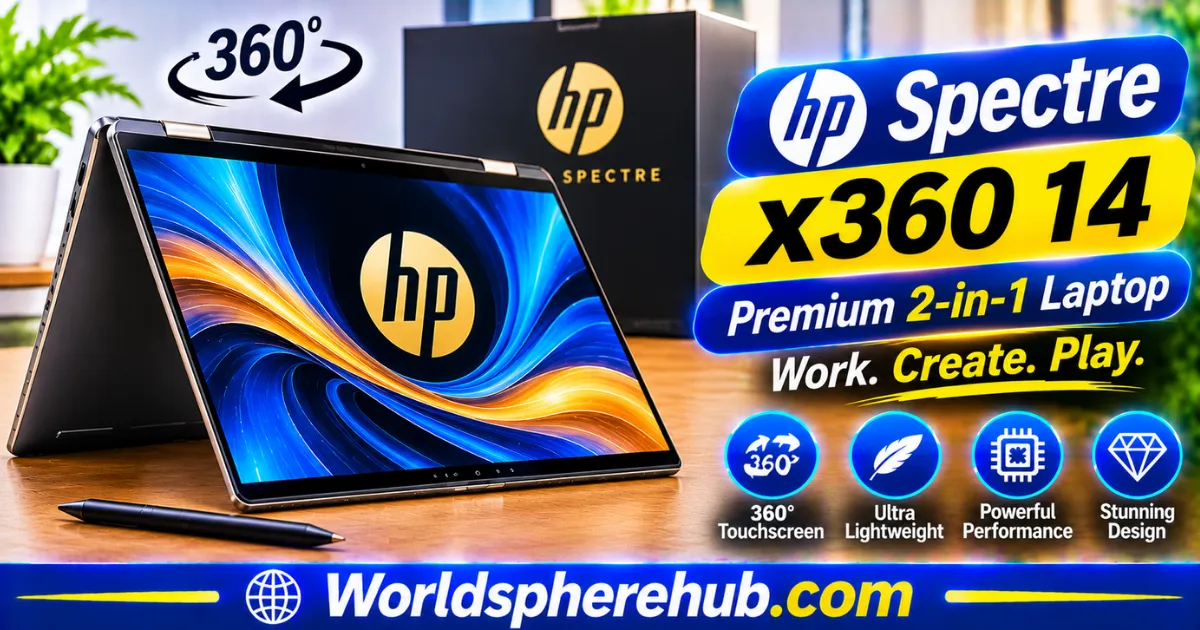
The HP Spectre x360 14 is a 2024 convertible laptop with a 2.8K 120Hz OLED touchscreen, Intel Core Ultra processors, a 68Wh battery, quad speakers, and a 9MP webcam. Reviewers praise its display and design, while no discrete GPU, soldered RAM, and its replacement by OmniBook Ultra Flip are drawbacks.
Specifications at a Glance
| Feature | Details |
|---|---|
| Display | 14-inch 2.8K (2880 x 1800) 16:10 OLED touchscreen, 120Hz |
| Processor | Intel Core Ultra 5 125H or Core Ultra 7 155H |
| Graphics | Intel Arc integrated graphics |
| Memory | 16GB or 32GB LPDDR5X (soldered) |
| Storage | 512GB, 1TB, or 2TB SSD |
| Battery | 68Wh |
| Ports | 2 USB-C with Thunderbolt 4, 1 USB-A, 3.5mm audio |
| Wireless | Wi-Fi 7 and Bluetooth 5.4 on many versions |
| Webcam | 9MP with infrared camera for Windows Hello |
| Audio | Quad speakers |
| Weight | About 3.19 pounds |
Design and Build Quality
Reviewers use words like opulent and attractive for the Spectre x360 14. The aluminum body feels dense and premium, and the 360-degree hinge supports laptop, tent, stand, and tablet modes. Notebookcheck’s testing lists a weight of about 1.45 kilograms, or 3.2 pounds, which is a little heavy for a 14-inch laptop. Space.com noted that even Lenovo’s 13.3-inch Yoga 9i weighs less, at 2.98 pounds.
Security options include a fingerprint sensor and an infrared camera for fast Windows Hello face login. Windows Central’s comparison notes that the webcam has a privacy shutter.
A pen is a nice extra in many bundles. One review noted that the included pen is a notable bonus compared with competitors that charge extra, though what ships in the box varies by region.
Display
The 14-inch OLED touchscreen is the main reason to buy this laptop. It has a 2880 x 1800 resolution in a 16:10 shape, a 120Hz refresh rate, and touch and pen support. HP lists around 400 nits for standard use and up to 500 nits in HDR, with 100% DCI-P3 coverage. RTINGS found full DCI-P3 and near-full Adobe RGB coverage, which makes it appealing for photographers and designers.
Windows Central describes the screen as getting full marks and notes that HP offers only one display option, which keeps the buying decision simple. OLED provides deep blacks and punchy color, but there are trade-offs. The panel is glossy, which can reflect light, and RTINGS warns that OLED screens can be susceptible to permanent burn-in. Using a dark mode, auto-hiding the taskbar, and setting a screen saver can help.
Keyboard, Touchpad, and Pen
The keyboard has a bouncy feel that reviewers like. LaptopMag praised the keyboard and RTINGS describes it as spacious. The haptic touchpad is more controversial. Digital Trends called it excellent, and RTINGS found it easy to use, while Wired reported that it can be erratic and miss taps or clicks depending on where you press.
If you plan to write or draw, the touchscreen supports inking, and a pen helps with notes, markups, and sketching. Tablet mode is comfortable for reading and note-taking, though the laptop’s weight makes long handheld sessions tiring.
Performance
The Spectre x360 14 uses Intel’s Meteor Lake-based Core Ultra H-series processors, including the Core Ultra 5 125H and Core Ultra 7 155H. Digital Trends reported that in performance mode, the CPU fell between a 28-watt 12-core Core i7-1360P and a 45-watt 14-core Core i7-13700H. That is strong productivity performance for a thin convertible. Digital Trends called the productivity performance very good.
Graphics come from Intel Arc integrated graphics. RTINGS notes that the CPU and integrated GPU cannot handle highly demanding workloads, and TechSpot highlighted the lack of a discrete GPU as a drawback. The laptop is excellent for office work, browsing, photo editing, and light creative tasks. It is not a gaming laptop or a heavy video-editing workstation.
Thermals and Noise
RTINGS says the keyboard gets a bit toasty under load, but the fans are relatively quiet. Buyary’s summary says users applaud its quiet fans and sturdy aluminum chassis. In everyday use, the laptop stays composed. If you push it hard with long exports or demanding apps, expect warmth and fan noise to increase.
Battery Life
The Spectre x360 14 has a 68Wh battery. RTINGS reports around 11 hours of light use, and LaptopMag highlights 11-plus hours in its review. Digital Trends rated battery life as good to great. Compared with newer laptops using Intel’s Lunar Lake chips, that is not exceptional, but it is solid for a laptop with a 120Hz OLED panel.
To stretch battery life, lower the refresh rate when you do not need 120Hz, reduce brightness, and use a power-saving mode.
Webcam and Speakers
The webcam is one of the highlights. HP lists a 9MP sensor, and RTINGS calls it an outstanding 4K webcam. It delivers sharper video than most laptop cameras, which is a big benefit for remote work.
Audio is also strong. The Spectre x360 14 has quad speakers, including top-firing drivers. LaptopMag called them bumpin’, and RTINGS found the speakers sound better than those on a rival Lenovo convertible. For movies and calls, they are more than adequate.
Ports and Wireless
Port selection is balanced but limited. You get two Thunderbolt 4 USB-C ports, one USB-A port, and a 3.5mm audio jack. There is no HDMI port or SD card reader, so you may need a dongle or dock. Dell’s XPS 14, by comparison, offers three Thunderbolt 4 ports and a microSD reader.
Wireless support is modern. HP offers Wi-Fi 7 and Bluetooth 5.4 on many versions, and some configurations use Wi-Fi 6E.
Upgradeability and Durability
RTINGS says the SSD is fast and user-replaceable, which is helpful if you need more storage later. RAM is soldered, so choose 16GB or 32GB carefully when you buy. As a convertible, the hinge should be checked on any used unit, because it gets heavy use.
How It Compares With the Dell XPS 14 and Lenovo Yoga 9i
| Feature | HP Spectre x360 14 | Dell XPS 14 (9440) | Lenovo Yoga 9i (Gen 9) |
|---|---|---|---|
| Form factor | Convertible 2-in-1 | Traditional laptop | Convertible 2-in-1 |
| Display | 2.8K OLED, 120Hz touch | Multiple options | 2.8K OLED touch |
| Discrete GPU | No | Optional RTX 4050 | No |
| Ports | 2 Thunderbolt 4, USB-A, 3.5mm | 3 Thunderbolt 4, microSD, 3.5mm | Dual Thunderbolt 4, USB-A, 3.5mm |
| Standout | 9MP webcam, quad speakers | Optional GPU, more ports | Soundbar hinge, Copilot key |
Windows Central recommends the Spectre x360 for people who want a versatile convertible with strong battery life, even without a discrete GPU option. Buyary’s summary says it stands out against the Yoga 9i for quieter fans, a better keyboard, and longer battery life, though opinions vary. If you want a discrete graphics option and more ports, the Dell XPS 14 is the better fit.
The Replacement: HP OmniBook Ultra Flip 14
HP replaced the Spectre x360 14 with the OmniBook Ultra Flip 14, which keeps the 14-inch 2.8K OLED display but moves to Intel Lunar Lake processors. It is thinner, lighter, and, according to one comparison, lasts much longer on a charge. If you want the latest design and efficiency, the OmniBook Ultra Flip is the better pick. If you find a Spectre x360 14 at a strong value, it remains a capable, beautiful laptop.
Buying Tips for a Used or Refurbished Unit
- Check battery health and the number of charge cycles
- Inspect the OLED screen for burn-in, scratches, and dead pixels
- Test the hinge in all four modes
- Confirm the pen and charger are included
- Check the touchpad for responsiveness
- Ask about warranty and return policy
Strengths and Limitations
| Strengths | Limitations |
|---|---|
| Stunning 2.8K 120Hz OLED touchscreen | No discrete graphics option |
| Excellent 9MP webcam and quad speakers | RAM is soldered |
| Premium aluminum design and flexible hinge | OLED can suffer burn-in |
| Good battery life, around 11 hours in light use | Keyboard can get warm under load |
| Thunderbolt 4, USB-A, and Wi-Fi 7 | Limited ports and no card reader |
Who Should Buy the Spectre x360 14?
The Spectre x360 14 suits professionals, students, and creatives who want a beautiful convertible with a great display, strong webcam, and capable everyday performance. It is a good fit for note-takers, presenters, and people who switch between laptop and tablet use.
If you need gaming power, choose a laptop with a discrete GPU. If you want the best battery life and the newest design, consider the OmniBook Ultra Flip 14. Prices and availability vary by region, so compare current listings.
Frequently Asked Questions
1: What processor does the HP Spectre x360 14 use?
It uses Intel Core Ultra processors, including the Core Ultra 5 125H and Core Ultra 7 155H, with integrated Intel Arc graphics.
2: How long does the Spectre x360 14 battery last?
It has a 68Wh battery. RTINGS reports around 11 hours of light use, and LaptopMag highlights more than 11 hours.
3: Does the Spectre x360 14 have a good webcam?
Yes. HP lists a 9MP webcam with an infrared camera for Windows Hello, and RTINGS calls it an outstanding 4K webcam.
4: Can I upgrade the RAM or storage?
The RAM is soldered and cannot be upgraded, but RTINGS says the SSD is fast and user-replaceable.
5: Is the HP Spectre x360 14 still worth buying?
It can be if you find a good deal on a well-kept unit. HP has replaced it with the OmniBook Ultra Flip 14, which is thinner and has longer battery life.
Explore More Continue Reading Our Guide on: VCR TV Guide: How to Watch VHS Tapes on a Modern TV in 2026
VHS TV Combo Review: Vintage CRT TV/VCRs, New RetroBox, and What to Know Before You Buy
Best Laptop Cooling Pad: Top Picks, Types, and How to Choose in 2026
DJI Mini 4 Pro: Features and Key Benefits
LG OLED TV Review: 2026 B6, C6, G6, and W6 Compared
Conclusion
The HP Spectre x360 14 offers a stunning 120Hz OLED touchscreen, aluminum design, quad speakers, a sharp 9MP webcam, and Thunderbolt 4 flexibility. Limitations include soldered RAM, no discrete graphics, OLED burn-in risk, warm keyboard under load, and discontinued status.