MacBook Air M2 Review: Features, Performance, Price & More in 2026
Short Direct Answer
The MacBook Air M2 remains a powerful and efficient laptop for students, professionals, and everyday users. With its lightweight design, excellent battery life, sharp Retina display, silent performance, and powerful Apple silicon chip, it continues to offer great value for users who need a reliable laptop for work, creativity, and entertainment.
Introduction
The MacBook Air M2 remains one of Apple’s most popular laptops because it offers a powerful combination of performance, portability, battery life, and premium design. Designed for students, professionals, remote workers, and everyday users, this laptop delivers a smooth computing experience without the need for a bulky design or noisy cooling fans.
Apple introduced the MacBook Air M2 as a major improvement over previous generations, bringing the powerful Apple silicon M2 chip, a refreshed design, and a brighter display. Even with newer MacBook models available, it continues to attract buyers in the United States because of its excellent balance between price and performance.
For users who need a reliable laptop for work, education, entertainment, and creative tasks, the MacBook Air M2 remains a strong option. Its lightweight body, efficient processor, and long battery life make it suitable for people who need a computer they can carry anywhere.
MacBook Air M2 Overview
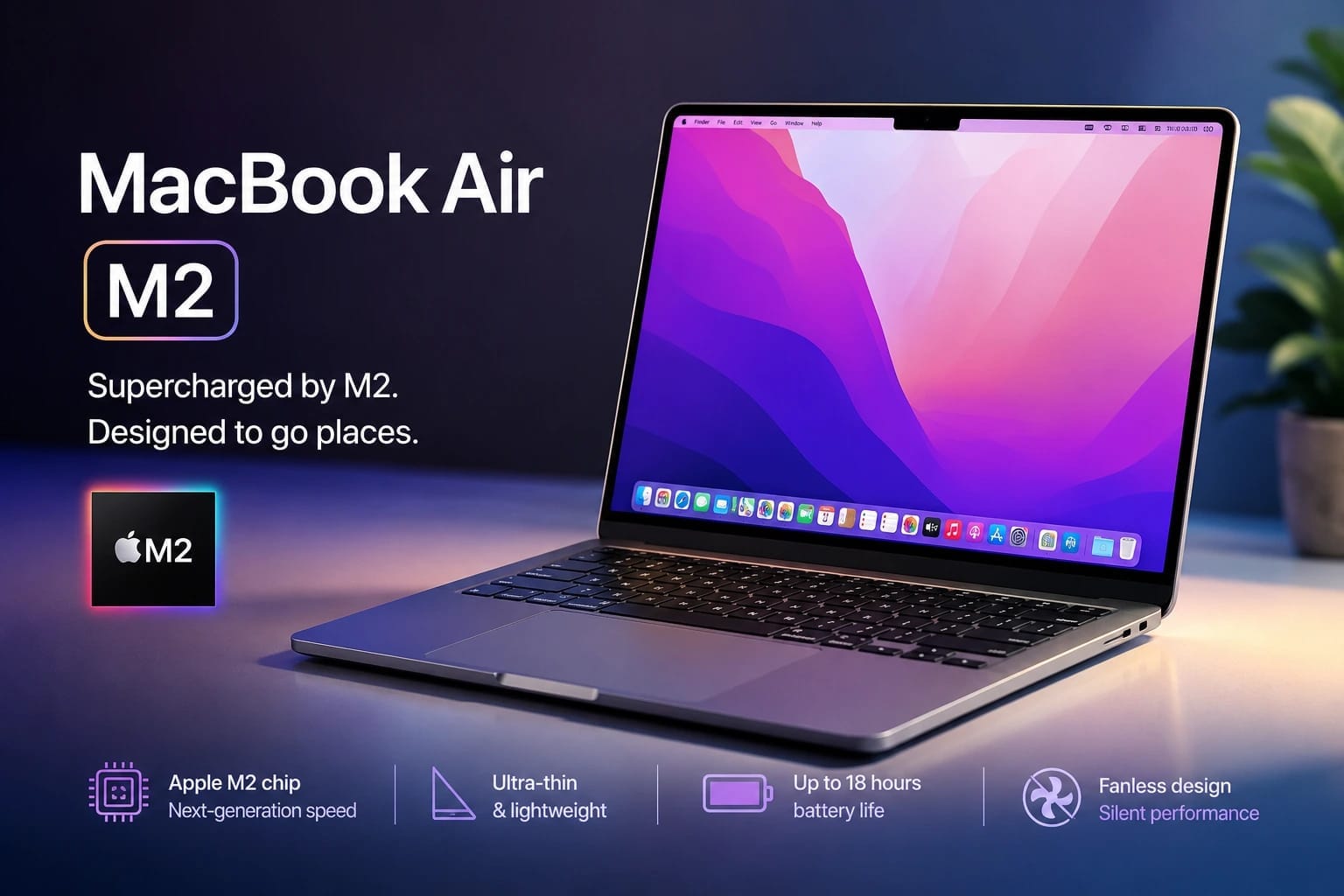
The MacBook Air M2 is a thin and lightweight laptop powered by Apple’s M2 chip. It represents a new generation of Apple’s fanless laptop design, focusing on efficiency, speed, and a quiet user experience.
Unlike traditional laptops that rely on bulky cooling systems, this model uses Apple’s efficient architecture to deliver strong performance while maintaining a slim profile.
Key Features
Some of the major features of the MacBook Air M2 include:
- Apple M2 chip
- 13.6-inch Liquid Retina display
- Lightweight aluminum design
- Up to 18 hours of battery life
- MagSafe charging support
- 1080p FaceTime HD camera
- Touch ID
- Silent fanless operation
- macOS support
- Multiple storage and memory options
These features make it a practical choice for users who want a premium laptop experience without moving to a higher-priced MacBook Pro model.
Performance Focus
The main attraction of this laptop is its Apple silicon technology. The M2 chip improves speed, efficiency, and graphics performance compared with older Intel-based MacBook models.
It handles everyday activities such as:
- Web browsing
- Video calls
- Document editing
- Streaming
- Online learning
- Office work
- Photo editing
The combination of hardware and software optimization allows the laptop to perform smoothly in daily situations.
Design and Build Quality
The design of the MacBook Air M2 brings a modern look with a flat-edge appearance similar to Apple’s premium laptop lineup. It replaces the older wedge-shaped design with a more balanced and professional style.
Premium Aluminum Construction
Apple continues to use high-quality aluminum materials to create a durable and lightweight laptop.
Design advantages include:
- Strong aluminum body
- Premium finish
- Slim profile
- Portable construction
- Excellent build quality
- Comfortable typing position
The solid construction gives the laptop a premium feel while keeping the weight low enough for daily travel.
Lightweight and Portable Design
Portability is one of the biggest reasons users choose the MacBook Air M2.
The laptop is ideal for:
- College students
- Office professionals
- Remote workers
- Travelers
- Digital creators
Its lightweight design makes it easy to carry in a backpack or laptop bag without adding unnecessary weight.
Color Options
Apple offers several attractive finishes that allow users to choose a style that matches their preference.
Available colors include:
- Midnight
- Starlight
- Space Gray
- Silver
Each option provides a premium appearance while maintaining Apple’s minimalist design approach.
Liquid Retina Display
The display is one of the strongest features of the MacBook Air M2. Apple upgraded the screen with a larger size and improved visual quality compared with earlier models.
Bright and Detailed Visual Experience
The Liquid Retina display delivers sharp images and accurate colors for everyday use.
Display benefits include:
- 13.6-inch screen size
- High resolution
- True Tone technology
- Wide color support
- Excellent brightness
- Sharp text quality
Whether watching videos, editing photos, or working on documents, the display provides an enjoyable viewing experience.
Productivity and Entertainment
The screen size offers enough space for multitasking while keeping the laptop compact.
Users can comfortably enjoy:
- Video streaming
- Online meetings
- Photo editing
- Presentations
- Research work
- Creative projects
The display quality makes the laptop suitable for both professional and personal use.
Camera and Display Experience
The improved display works well with the upgraded 1080p FaceTime HD camera.
This combination improves:
- Video meetings
- Online classes
- Remote work
- Virtual presentations
For users who spend significant time on video calls, the improved camera provides a better communication experience.
Performance
Performance is one of the biggest upgrades of the MacBook Air M2. Apple’s M2 chip provides fast processing power while maintaining excellent energy efficiency.
Apple M2 Chip
The M2 chip is designed to handle demanding workloads while consuming less power.
It improves:
- CPU performance
- Graphics performance
- Machine learning tasks
- App responsiveness
- Overall system efficiency
For most users, the performance feels fast and reliable throughout daily activities.
Everyday Performance
The laptop handles common tasks without difficulty.
It performs well for:
- Microsoft Office applications
- Web browsing
- Video conferencing
- Streaming services
- Coding
- Light creative work
- School assignments
The smooth performance makes it a dependable computer for everyday users.
Creative Performance
Although designed as an entry-level MacBook, the MacBook Air M2 can handle many creative tasks.
It is suitable for:
- Photo editing
- Graphic design
- Music production
- Basic video editing
- Content creation
Professional users working with extremely demanding projects may prefer a MacBook Pro, but casual creators will find the performance impressive.
macOS Experience
The software experience is another major advantage of choosing an Apple laptop. The MacBook Air M2 runs macOS, which provides a clean, secure, and user-friendly operating system.
Smooth and Simple Interface
macOS offers an organized experience with features designed for productivity.
Benefits include:
- Easy navigation
- Strong security
- Regular updates
- Excellent app support
- Smooth system performance
The operating system works closely with Apple’s hardware to provide reliable performance.
Apple Ecosystem Integration
Users who already own Apple devices can enjoy additional benefits.
Integration features include:
- AirDrop file sharing
- iCloud synchronization
- Universal Clipboard
- Handoff between devices
- iPhone connectivity
This ecosystem makes it easier to manage files, messages, and daily tasks across multiple Apple products.
Productivity Features
macOS includes several tools that help users work more efficiently.
Useful features include:
- Multiple desktops
- Advanced search
- Focus modes
- Screenshot tools
- Built-in productivity applications
These features help students, professionals, and business users stay organized.
Part 1 Summary
The MacBook Air M2 offers a premium laptop experience with its modern design, powerful M2 chip, beautiful Liquid Retina display, and smooth macOS performance. Its lightweight construction and efficient hardware make it an excellent choice for students, professionals, and everyday users in the United States.
Battery Life
Battery life is one of the strongest advantages of the MacBook Air M2. Thanks to Apple’s efficient M2 chip and optimized macOS software, the laptop can provide excellent endurance for work, study, and entertainment.
For users in the United States who need a reliable laptop for travel, office work, or college, the long battery performance makes it a convenient everyday device.
Everyday Battery Performance
The MacBook Air M2 can easily handle a full day of normal usage.
Typical activities include:
- Web browsing
- Email communication
- Video meetings
- Document editing
- Online classes
- Streaming videos
- Light creative work
The efficient processor helps reduce power consumption while maintaining smooth performance.
Battery Efficiency
Apple’s M2 chip is designed to balance speed and energy efficiency. Unlike many traditional laptops, the fanless design allows the device to operate quietly while using power effectively.
Battery efficiency benefits include:
- Lower energy consumption
- Longer unplugged usage
- Quiet operation
- Better portability
- Consistent performance
This makes the laptop especially useful for students, professionals, and frequent travelers.
Charging Performance
The MacBook Air M2 supports MagSafe charging, giving users a convenient and secure way to recharge their laptop.
MagSafe Charging Support
The return of MagSafe charging improves the overall user experience.
Benefits include:
- Magnetic charging connection
- Easy cable attachment
- Reduced risk of accidental cable pulls
- Dedicated charging port
- Better desk organization
Users can also charge through USB-C ports when needed.
Charging Speed
Charging performance is reliable for daily use.
Users can choose different charging options depending on their needs:
- Standard power adapter
- Fast charging adapter
- USB-C charging accessories
- Travel-friendly chargers
A quick charging session can provide enough power for several hours of productivity.
Keyboard and Trackpad
Apple continues to provide one of the best laptop input experiences with the MacBook Air M2. The keyboard and trackpad are designed for comfortable everyday use.
Magic Keyboard Experience
The keyboard offers a comfortable typing experience for long work sessions.
Keyboard advantages include:
- Responsive keys
- Good key travel
- Backlight support
- Quiet typing
- Touch ID integration
Whether writing documents, coding, or sending emails, the keyboard feels accurate and reliable.
Touch ID Convenience
Touch ID adds security and convenience by allowing users to quickly unlock their laptop.
It can also be used for:
- Password authentication
- App purchases
- Secure account access
- System settings
This feature makes daily tasks faster and easier.
Large Force Touch Trackpad
The trackpad remains one of Apple’s strongest laptop features.
Benefits include:
- Precise cursor control
- Multi-touch gestures
- Smooth scrolling
- Pressure sensitivity
- Large working area
The responsive trackpad improves navigation and productivity.
Audio Quality
The MacBook Air M2 delivers impressive sound quality despite its thin and lightweight design.
Speaker Performance
The built-in speakers provide clear and balanced audio.
Audio advantages include:
- Stronger bass response
- Clear vocals
- Wide stereo sound
- Better movie experience
- Improved music playback
For everyday entertainment, the speakers perform better than many laptops in the same category.
Microphone Quality
The built-in microphone system is designed for modern communication needs.
It works well for:
- Video conferences
- Online classes
- Voice recordings
- Business meetings
- Virtual presentations
The improved microphone quality helps create a clearer communication experience.
Connectivity
The MacBook Air M2 provides essential connectivity options while maintaining a slim design.
Ports and Connections
Available connection options include:
- MagSafe charging port
- Two Thunderbolt/USB-C ports
- 3.5mm headphone jack
While the port selection is limited compared with some Windows laptops, it covers the needs of most everyday users.
Wireless Connectivity
The laptop supports modern wireless technologies.
Connectivity features include:
- Wi-Fi support
- Bluetooth connectivity
- Wireless accessories
- External displays
These options provide reliable connections for work, entertainment, and productivity.
MacBook Air M2 vs Competitors
The laptop market offers many alternatives, but the MacBook Air M2 remains competitive because of its combination of performance, battery life, and software optimization.
MacBook Air M2 vs Windows Laptops
Many Windows laptops offer similar specifications, but Apple’s advantage comes from hardware and software integration.
The MacBook Air M2 offers:
- Better battery efficiency
- Premium build quality
- Smooth operating system
- Silent fanless design
- Strong resale value
Windows laptops may provide more ports or customization options, but the MacBook Air delivers a more streamlined experience.
MacBook Air M2 vs MacBook Air M3
The newer MacBook Air M3 provides improved performance and some updated features.
However, the MacBook Air M2 remains attractive because it offers:
- Lower price
- Excellent performance
- Similar design
- Long battery life
- Premium user experience
For many users, the M2 model provides better value.
MacBook Air M2 vs MacBook Pro
MacBook Pro models are designed for professional workloads.
The MacBook Pro offers advantages such as:
- More powerful chips
- Active cooling
- Better sustained performance
- More ports
However, the MacBook Air M2 is lighter, quieter, and more affordable, making it better suited for everyday users.
Pricing and Value in the United States
The price of the MacBook Air M2 has become more attractive as newer Apple models have entered the market.
In the United States, pricing depends on storage, memory configuration, retailer discounts, and availability.
Current Market Value
The laptop provides strong value because it includes:
- Premium aluminum design
- Powerful Apple silicon performance
- Excellent battery life
- High-quality display
- Long software support
For students and professionals, it offers a premium experience without reaching the highest MacBook Pro prices.
Buying Options
Customers in the USA can find the laptop through:
- Apple Store
- Authorized retailers
- Online marketplaces
- Education discounts
- Certified refurbished programs
Choosing the right seller can help buyers save money while getting a reliable device.
Is the MacBook Air M2 Worth the Price?
For most users, the MacBook Air M2 offers excellent value.
It is especially recommended for:
- College students
- Office workers
- Remote employees
- Creators
- Business users
- Everyday computer users
Its combination of performance, portability, and battery life makes it one of the most balanced laptops in its category.
Part 2 Summary
The MacBook Air M2 delivers impressive battery life, comfortable keyboard performance, excellent audio quality, reliable connectivity, and strong overall value. Its efficient design and powerful M2 chip make it a dependable laptop for a wide range of users in the United States.
Pros of the MacBook Air M2
The MacBook Air M2 continues to be one of Apple’s most popular laptops because it offers an excellent combination of performance, portability, and efficiency. It is designed for users who want a premium laptop experience without paying the higher price of professional models.
Premium Design and Portability
One of the biggest advantages of the MacBook Air M2 is its lightweight and stylish design.
Key design benefits include:
- Premium aluminum body
- Slim profile
- Lightweight construction
- Durable build quality
- Modern appearance
- Easy portability
Its compact design makes it ideal for students, professionals, and travelers who need a reliable laptop on the go.
Excellent Performance
The M2 chip provides strong performance for a wide range of tasks.
The laptop handles:
- Office applications
- Online meetings
- Web browsing
- Programming
- Photo editing
- Content creation
- Entertainment
The combination of Apple’s hardware and software optimization creates a smooth and responsive experience.
Outstanding Battery Life
Battery performance is another major strength of the MacBook Air M2.
Users benefit from:
- Long hours of productivity
- Efficient power management
- Quiet operation
- Reliable travel performance
The ability to work for extended periods without charging makes it a practical choice for busy users.
High-Quality Display
The Liquid Retina display provides excellent image quality.
Display advantages include:
- Sharp resolution
- Accurate colors
- Bright visuals
- Wide viewing angles
- Comfortable viewing experience
It works well for productivity, entertainment, and creative projects.
Cons of the MacBook Air M2
Although the MacBook Air M2 is an excellent laptop, it does have some limitations that buyers should consider.
Limited Port Selection
The laptop includes only essential ports.
Available connections include:
- Two USB-C ports
- MagSafe charging
- Headphone jack
Users who connect many external devices may need adapters or docking stations.
Not Designed for Extreme Professional Workloads
The MacBook Air M2 performs well for most users, but it is not designed for the heaviest professional tasks.
Users working with:
- Large 3D projects
- Advanced video production
- Complex simulations
- Heavy professional applications
may benefit from a MacBook Pro with a more powerful chip and active cooling system.
Limited Upgrade Options
Like most modern Apple laptops, the memory and storage are not user-upgradable after purchase.
This means buyers should carefully choose:
- RAM capacity
- Storage size
before completing their purchase.
Who Should Buy the MacBook Air M2?
The MacBook Air M2 is an excellent choice for users who need a lightweight, powerful, and reliable laptop for everyday activities.
Students
Students can benefit greatly from this laptop because it offers:
- Long battery life
- Portable design
- Fast performance
- Excellent note-taking experience
- Support for online learning
It is suitable for school assignments, research, presentations, and entertainment.
Professionals
The laptop is also a strong option for office workers and remote employees.
It handles:
- Business documents
- Video meetings
- Email management
- Presentations
- Productivity applications
Its portability makes it convenient for professionals who work from different locations.
Content Creators
Creative users can also benefit from the MacBook Air M2.
It works well for:
- Photo editing
- Social media content
- Graphic design
- Basic video editing
- Music projects
Creators with extremely demanding workflows may prefer higher-end models, but many users will find the performance more than enough.
Who Should Consider Another Laptop?
While the MacBook Air M2 is suitable for many people, some users may need a different device.
Professional Power Users
Users who regularly perform intensive tasks may prefer more powerful machines.
Examples include:
- Professional video editors
- 3D artists
- Advanced developers
- Engineers using demanding software
A MacBook Pro or workstation-class laptop may be a better fit.
Users Who Need Many Ports
People who frequently connect multiple accessories may prefer laptops with more built-in connectivity options.
Additional ports may be useful for:
- External monitors
- Storage devices
- Professional equipment
- Multiple accessories
Expert Buying Tips
Before purchasing the MacBook Air M2, consider these important tips.
Choose the Right Storage
Storage selection is important because it cannot be upgraded later.
Consider your needs:
- 256GB for basic users
- 512GB for regular creators
- Higher storage for large files and professional work
Choosing the correct storage helps avoid limitations in the future.
Select Suitable Memory
RAM affects multitasking performance.
Users should consider:
- 8GB for basic tasks
- 16GB for heavier multitasking
- Higher memory options for demanding workflows
Choosing enough memory ensures smoother long-term performance.
Consider Refurbished Options
Certified refurbished models can provide excellent value.
Benefits include:
- Lower cost
- Tested hardware
- Quality assurance
- Access to premium features at a reduced price
This option is popular among budget-conscious buyers in the USA.
Frequently Asked Questions
1 Is the MacBook Air M2 still worth buying in 2026?
Yes. The MacBook Air M2 remains a strong choice for users who want excellent performance, long battery life, a premium design, and reliable macOS support at a reasonable price.
2 Is the MacBook Air M2 good for students?
Yes. Its lightweight design, long battery life, and powerful performance make it one of the best laptops for students.
3 Can the MacBook Air M2 handle video editing?
Yes. It can handle basic and moderate video editing tasks. Users working on professional-level video projects may prefer a MacBook Pro.
4 Does the MacBook Air M2 support gaming?
The laptop can run many casual games and some optimized titles. However, it is not designed as a dedicated gaming laptop.
5 How long will the MacBook Air M2 last?
With proper care, the laptop can provide several years of reliable performance thanks to Apple’s strong hardware quality and software support.
Final Verdict
The MacBook Air M2 remains one of the best balanced laptops available for everyday users. It combines powerful performance, excellent battery life, premium design, and a beautiful display in a lightweight package.
While it has some limitations, such as fewer ports and reduced upgrade options, these drawbacks are minor for most users. For students, professionals, and casual creators in the United States, it provides an impressive combination of speed, efficiency, and value.
Overall Rating
| Category | Rating |
|---|---|
| Design & Build Quality | ⭐⭐⭐⭐⭐ (5.0/5) |
| Display Quality | ⭐⭐⭐⭐⭐ (4.8/5) |
| Performance | ⭐⭐⭐⭐⭐ (4.8/5) |
| Battery Life | ⭐⭐⭐⭐⭐ (5.0/5) |
| Keyboard & Trackpad | ⭐⭐⭐⭐⭐ (4.9/5) |
| Audio Quality | ⭐⭐⭐⭐☆ (4.7/5) |
| Software Experience | ⭐⭐⭐⭐⭐ (4.9/5) |
| Value for Money | ⭐⭐⭐⭐⭐ (4.8/5) |
| Overall Score | ⭐⭐⭐⭐⭐ (4.9/5) |
Read More: Canva Review: Features, Pricing, Pros & Cons in 2026
Conclusion
The MacBook Air M2 remains a reliable laptop with strong performance, long battery life, premium design, and a smooth macOS experience. It is an excellent choice for students, professionals, and everyday users looking for a lightweight and powerful computer with great value in 2026.